Proof & getting started · No. 39
Scaffold a .NET modular monolith in one command, then build your first module
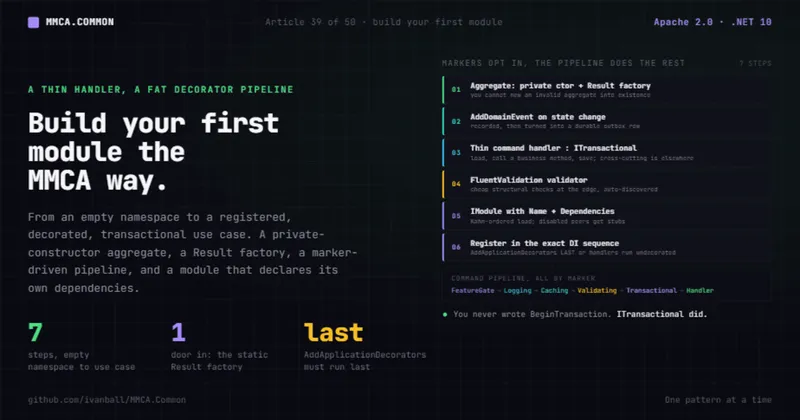
One command writes the solution. The seven steps after it are the ones worth understanding, because they are what makes the generated code safe to change.
Most "add a feature" guides skip the parts that actually keep a codebase honest a year later. They show you a controller and a service class and call it a vertical slice. Then the aggregate has a public setter, the handler opens its own transaction by hand, validation lives in three places, and nobody can say which module owns which table.
MMCA.Common has opinions about all of that, and they are enforced opinions: a domain aggregate with no public constructor, a use case that is a thin handler wrapped by a fat decorator pipeline, and a module that declares its own dependencies so the host can assemble everything in the right order.
The framework ships a dotnet new pack, so you type none of that plumbing (ADR-065). Hand-rolling it
costs a day before you write a line of business logic, and ADR-065 measures that starting cost against
the framework's reference app: 12 projects, 133 files, and 10,662 lines of plumbing, an 827-line
.editorconfig among them, plus the 100-line Directory.Packages.props that carries every package pin
(58 of them in the seed today), several of those lines load-bearing in ways nothing tells you about
until much later.
That changes what a tutorial like this is for. Step 0 gets you a green solution in about a minute.
Steps 1 through 7 are the reasoning behind code you already have, which is what you need before you
change it. The example is a Coupon aggregate in a Promotions module, but every step maps directly
onto the real Conference, Sales, and Catalog modules in the consumer apps.
Prerequisites
- .NET 10 SDK. The framework targets
net10.0withLangVersion: previewfor C# extension types. - Familiarity with the layer flow: API/Grpc -> Infrastructure -> Application -> Domain -> Shared. Your module's code lives in those layers, and the framework forbids inward layers from referencing outward ones (a topic for the fitness-test tutorial).
- The conventions in your head: factory methods return
Result<T>instead of throwing; commands and queries are separate; private fields are_camelCase;TreatWarningsAsErrorsis on.
No credentials and no private feed: the packages are on nuget.org.
The example types below are representative of the module shape, not copied verbatim from a specific file. They follow the documented base classes and conventions exactly.
Step 0: scaffold the solution
dotnet new install MMCA.Templates
dotnet new mmca-app -n Contoso.Support --module Orders --aggregate Order
cd Contoso.Support

dotnet build Contoso.Support.slnx          # warning-free under all five analyzers
dotnet test  --solution Contoso.Support.slnx   # passing, fitness rules included, no database
Three names, all independent: the solution (also your root namespace), the first module in plural PascalCase, and its aggregate root in singular PascalCase. Everything derived from them follows, from the routes and the identifier alias to the cache-key prefix and the Blazor pages.
You get twelve projects: five module layers, a REST API host, a Blazor Server and MudBlazor UI host, an Aspire AppHost, a per-database migrations project, and three test projects. The aggregate arrives fully worked, in the same shape the rest of this article explains.
Get that green before you change anything. It is the line you bisect against later, and if it is not green that is a template bug rather than yours: the pack is generated from the framework's runnable reference app, and a smoke job builds two generated solutions in package mode on every change.
Two things the scaffold deliberately refuses to hand over, because a rename or a shape flag invalidates them and no fixed value is right for every name you could pick.
The first is declaration order, plus one constructor shape. Three analyzer rules, and only three,
ship dropped to suggestion in a marked block appended to the staged .editorconfig; every other
analyzer stays at error. SA1210 cannot sort your namespace against MMCA.Common.* without knowing
your name: an app namespace sorts above it for Contoso.Support and below it for Zeta.App, so no
checked-in order survives both. SA1211 is the same story one level down, on the identifier-alias
file whose aliases re-sort when a shape flag renames them. IDE0021 is the flags rather than the
renames: the aggregate's private constructor assigns one property per optional axis, so
--no-status --no-description --no-owner together leave it with a single statement, which the
baseline then wants as an expression body.
The second is your integration-event wire contract: a freeze inherited from someone else's sample
module guarantees nothing. All of it is one-time, and the generated README carries the exact commands
(one dotnet format analyzers run restores the two ordering rules; IDE0021 is not fixable that way,
so you fold the constructor by hand and delete the line).
Now the part worth reading.
Step 1: define the aggregate with a private constructor and a Result factory
Open the Domain layer of the module you just generated (Source/Modules/Orders/...Orders.Domain/), or
start a fresh one there. An aggregate root inherits from AuditableAggregateRootEntity<TId>, the top
rung of the framework's three-rung entity chain:
BaseEntity<TId> -> AuditableBaseEntity<TId> -> AuditableAggregateRootEntity<TId>BaseEntity<TId> gives you a required init identifier (set once at construction, immutable after,
while EF still materializes through the parameterless constructor). AuditableBaseEntity<TId> adds the
audit fields (CreatedOn/By, LastModifiedOn/By) and the soft-delete IsDeleted flag, all stamped
automatically. AuditableAggregateRootEntity<TId> adds the domain-event collection and aggregate
helpers.
The load-bearing idiom is the private constructor plus static Create factory returning
Result<T>. You cannot new an invalid aggregate into existence; the factory is the only door, and
it enforces the invariants:
// Domain layer (representative)
public sealed class Coupon : AuditableAggregateRootEntity<CouponIdentifierType>
{
    public string Code { get; private set; }
    public decimal PercentOff { get; private set; }
    public bool IsActive { get; private set; }

    private Coupon() { }   // EF materializes through this; callers cannot use it

    public static Result<Coupon> Create(string code, decimal percentOff)
    {
        if (string.IsNullOrWhiteSpace(code))
        {
            return Result.Failure<Coupon>(CouponErrors.CodeRequired);
        }

        if (percentOff is <= 0 or > 100)
        {
            return Result.Failure<Coupon>(CouponErrors.PercentOutOfRange);
        }

        var coupon = new Coupon
        {
            Id = default,            // DB-generated identity; the factory leaves it
            Code = code.Trim(),
            PercentOff = percentOff,
            IsActive = true,
        };

        return Result.Success(coupon);
    }
}
Two things to notice. The setters are private so state changes only through methods on the aggregate.
And the factory returns Result<Coupon>, never throws, so a caller handles an invalid coupon as a value,
not an exception. This is the SOLID-and-DDD story in miniature: the factory is the single place
invariants live.
Step 2: raise a domain event with AddDomainEvent
State changes that other parts of the system care about are announced as domain events. You do not publish them directly; you record them on the aggregate, and the framework turns them into durable outbox rows in the same transaction that saves the data.
Add a business method that mutates state and records the event:
// On the Coupon aggregate (representative)
public Result Deactivate()
{
    if (!IsActive)
    {
        return Result.Failure(CouponErrors.AlreadyInactive);
    }

    IsActive = false;
    AddDomainEvent(new CouponDeactivated(Id, Code));
    return Result.Success();
}
The sequence is always: the aggregate mutates its own state, then calls AddDomainEvent(...), and the
event sits in the aggregate's collection until SaveChanges runs. At save time the framework stamps the
audit fields, captures the domain events, serializes them to OutboxMessage rows, commits data and
outbox in one transaction, then dispatches in-process and marks the rows processed. You write one line;
the durability and the eventual broker delivery come for free (the transactional-outbox article covers
that machine in full).
AddDomainEvent lives on AuditableAggregateRootEntity<TId>, so any aggregate can raise events, and
nothing in the Domain layer knows or cares how they will eventually be delivered.
Step 3: write the command and its handler
A write is a use case: a small command object handed to a handler that does exactly one thing. The
handler implements ICommandHandler<TCommand, TResult>, which is a single method,
Task<TResult> HandleAsync(TCommand, CancellationToken), returning Result or Result<T>.
Keep the handler thin. It loads the aggregate, calls a business method, and saves. Everything cross-cutting (logging, caching, transactions) is added by the pipeline, not by the handler.
// Application layer (representative)
// The command is a plain record; the result type is declared on the handler below.
public sealed record CreateCouponCommand(string Code, decimal PercentOff)
    : ITransactional;   // ITransactional opts into a DB transaction

public sealed class CreateCouponHandler(ICouponRepository repository)
    : ICommandHandler<CreateCouponCommand, Result<CouponIdentifierType>>
{
    public async Task<Result<CouponIdentifierType>> HandleAsync(
        CreateCouponCommand command, CancellationToken cancellationToken)
    {
        var couponResult = Coupon.Create(command.Code, command.PercentOff);
        if (couponResult.IsFailure)
        {
            return Result.Failure<CouponIdentifierType>(couponResult.Errors);
        }

        await repository.AddAsync(couponResult.Value, cancellationToken);
        return Result.Success(couponResult.Value.Id);
    }
}
The marker interface ITransactional is the whole transaction opt-in. It is an empty interface; the
type is the message. When the command implements it, the TransactionalCommandDecorator wraps the
handler in IUnitOfWork.ExecuteInTransactionAsync and rolls back on an exception. A handler that does
not need a transaction (a single SaveChanges whose atomicity the outbox already guarantees) simply
does not implement the marker. There is a sibling marker, ICacheInvalidating, that exposes a
CachePrefix to evict on success the same way.
Step 4: add a FluentValidation validator
Input validation does not belong in the handler. Write a FluentValidation validator for the command,
and the pipeline runs it automatically before the handler ever executes:
// Application layer (representative)
public sealed class CreateCouponCommandValidator : AbstractValidator<CreateCouponCommand>
{
    public CreateCouponCommandValidator()
    {
        RuleFor(c => c.Code).NotEmpty().MaximumLength(32);
        RuleFor(c => c.PercentOff).InclusiveBetween(0.01m, 100m);
    }
}
This is structural validation (shape, length, range). It complements the domain factory's invariant
checks rather than replacing them: the validator rejects obviously malformed input cheaply at the edge,
and Coupon.Create still enforces the business rules that must hold no matter how the call arrived. The
validator is auto-discovered by convention scanning in the next step, so you do not register it by hand.
Step 5: implement IModule
A module is the unit of cohesion above a feature slice. It implements IModule: a display Name,
an optional Dependencies list of other module names, a RequiresDependencies flag, and a single
Register(services, configuration, applicationSettings) method that wires all of the module's services.
The interface ships default-implemented members (Dependencies => [], RequiresDependencies => false,
an empty RegisterDisabledStubs), so a minimal module implements only Name and Register:
// Application layer (representative)
public sealed class PromotionsModule : IModule
{
    public string Name => "Promotions";

    // This module reads coupon usage from Sales, so declare the dependency.
    public IReadOnlyList<string> Dependencies => ["Sales"];

    public void Register(
        IServiceCollection services,
        IConfigurationBuilder configuration,
        ApplicationSettings applicationSettings)
    {
        services.AddScoped<ICouponRepository, CouponRepository>();
        // handlers, validators, and mappers are picked up by convention scanning (next step)
    }
}
Dependencies is what lets the framework do something genuinely useful: ModuleLoader discovers every
IModule and registers them in topological order (Kahn's algorithm) based on declared dependencies,
so a module is always wired after the modules it depends on. ModulesSettings (the "Modules" config
section) can disable a module; disabled modules receive stub registrations so cross-module interfaces
stay resolvable. That last detail is the extraction boundary: a module that depends on a now-remote module
keeps compiling and resolving because the stub stands in until a gRPC client takes over.
Step 6: register in the exact DI sequence
This is the step the most experienced developers still get wrong, because one ordering rule is
load-bearing. AddApplicationDecorators() must run after every module's handler scan, because Scrutor's
TryDecorate can only wrap handlers that are already registered. That is the only constraint that
matters here. The relative position of AddInfrastructure and AddAPI is not load-bearing: DI
dependencies resolve at runtime, not at registration time, so the infrastructure that backs the
decorated handlers can be registered before or after them. The framework documents the sequence this
way:
// Host composition root
services.AddApplication()                              // core services, event dispatcher
    .AddInfrastructure(configuration)                     // repos, UoW, DbContexts, caching, outbox
    .AddAPI(modulesSettings)                              // controllers, idempotency, exception handlers
    .ScanModuleApplicationServices<PromotionsClassRef>()  // this module's handlers, validators, mappers
    .ScanModuleApplicationServices<SalesClassRef>()       // another module
    .AddApplicationDecorators();                          // MUST be last: Scrutor wraps existing handlers
The rules embedded in that order:
ScanModuleApplicationServices<TMarker>()runs once per module. It auto-registers that module's domain-event handlers (singleton), DTO and request mappers (scoped), command and query handlers (scoped), and FluentValidation validators. This is why you did not register the validator from Step 4 or the handler from Step 3 by hand: convention scanning found them by the marker type's assembly.AddApplicationDecorators()must be last of the Application registrations. It uses Scrutor'sTryDecorateto wrap every already-registered handler. If you call it before a module'sScanModuleApplicationServices, that module's handlers are registered too late to be wrapped, and they silently run undecorated. No transactions, no caching, no logging, and no error to tell you.
Step 7: watch the decorator pipeline kick in, for free
With the sequence correct, every command and query handler is now wrapped, in this execution order:
Commands: FeatureGate -> Authorization -> Logging -> Caching -> Validating -> Timeout -> Transactional -> Handler
Queries:  FeatureGate -> Authorization -> Logging -> Caching -> Validating -> Timeout -> Handler
You wrote a thin handler. The pipeline added the rest, driven by the marker interfaces:
- FeatureGate is outermost and short-circuits the call when the feature flag for that command or query is turned off.
- Authorization comes next, and sits outside caching on purpose. Commands and queries that
implement
IRequiresPermissionare checked against the permission registry for the current user's roles, and a denial short-circuits with aForbiddenerror, so a denied query never reads from or populates the cache. - Logging records the full pipeline duration via
ICorrelationContext, for every handler, with no per-handler code. - Caching runs for queries that implement
IQueryCacheable(supplyingCacheKey+CacheDuration), and invalidates for commands that implementICacheInvalidating(on success, outside the transaction boundary). - Validating runs FluentValidation on both sides. On a command it runs before the transaction opens. On a query it sits inside Caching by design, because a cached entry was already validated when it was produced, so a cache hit skips the validator along with the handler.
- Timeout gives commands and queries that implement
IHasTimeouttheir own execution budget: the handler runs under a linked token cancelled when the budget expires, and expiry comes back as aRequest.TimedOutfailure rather than an exception, while caller cancellation still propagates as one. A budget of zero or less passes straight through. - Transactional opens a DB transaction only when the command implements
ITransactional, and rolls back on an exception. A business failure (Result.Failure) also rolls the transaction back:ExecuteInTransactionAsyncinspects the returned value and, onResult { IsFailure: true }, callsRollbackTransaction()and skips the commit, choosing atomicity over partial persistence. Cache invalidation runs only on success, so a failed command evicts nothing either way.
Your CreateCouponCommand from Step 3 implemented ITransactional, so it now runs inside a transaction
automatically. You never wrote BeginTransaction. That is the payoff of the shape: the handler stays
about the use case, and the cross-cutting concerns are written once, in the framework, and reused by
every handler in every module.
The next slice, and the next module
You will repeat that shape for every feature you add, so the pack scaffolds it too, which keeps it from
drifting one hand-typed slice at a time. A single vertical slice is one command, run from the module's
UseCases folder:
dotnet new mmca-command -n CancelOrder --app Contoso.Support --module Orders `
  --aggregate Order --domain-method Cancel

dotnet new mmca-query -n GetOrderByNumber --app Contoso.Support --module Orders `
  --aggregate Order
Handlers are convention-scanned, so there is nothing to register. Two things still need you: add the
--domain-method guarded method to your aggregate before the command slice compiles, and keep the
query's CacheKey inside your module's *CacheKeys.Prefix. The caching decorator matches cacheable
reads to invalidating commands by string prefix, so a key that drifts out of it goes stale silently.
A whole second module, across all five layers plus its test and migrations projects:
dotnet new mmca-module -n Billing --app Contoso.Support --aggregate InvoiceHere is the boundary where generated code stops and you start. dotnet new cannot patch files that
already exist, so mmca-module prints seven numbered wire-ups it cannot perform, and until they
are done the module is invisible to the host and to the fitness rules. If your solution came from
mmca-app, you do not type any of them: that solution ships its own build/add-module.ps1, and the
printed text opens by telling you to run it instead, because it invokes the template and then performs
all seven itself. The list is the fallback for a hand-built solution, and the best description of what
the script is doing on your behalf:
- Solution. Add the eight new projects (five layer projects, both test projects, and the
migrations project) to the
.slnx. - Project references. The Web host needs the module's API project and its migrations project. The architecture-test project needs all five layer projects, because the map in step 4 names a type from each.
- Identifier alias. Copy the existing
<Compile Include ... Link>block inDirectory.Build.propsand point it at the new module's*.GlobalUsings.IdentifierType.cs. Without it the alias is invisible outside its own project. - Architecture map. Five lines in your
*ArchitectureMap.cs, one per layer. A module missing from the map is silently not covered by the layering and isolation rules. No error, no warning: the rules simply stop watching the code you just added. - Host. One
services.AddErrorResources<BillingErrorResources>();next to the existing ones.ModuleLoaderdiscovers theIModulefrom Step 5 itself, so nothing else needs registering. - Database. The module gets its own: an
AddDatabase/WithSQLServerDataSourcepair in the AppHost,Modules/DataSources/Outboxentries in the Web host'sappsettings.json, and the deletion of the now-conflicting top-levelSQLServerMigrationsAssembly. Every module database carries its own outbox and inbox tables, so two modules migrated into one database collide on them, and naming the outbox source explicitly is what stops it from moving the day you reorder those calls. - First migration.
dotnet ef migrations add InitialCreateagainst the new migrations project.
The first two are what make it compile, so they fail loudly. Numbers three and four do not, which is why they are worth reading twice. And the honest reading of the script is not that the wire-ups stopped mattering: it is that the one code path CI exercises now applies them for you, on a solution the template generated.
Trade-offs and gotchas, honestly
The shape buys consistency, and it asks for discipline in return:
- The DI order is unforgiving. Call
AddApplicationDecorators()too early and handlers run undecorated with no warning. Treat the documented sequence as a hard rule, and consider an architecture fitness test that asserts handlers are decorated (the next article covers fitness tests). - Markers are easy to forget.
ITransactionalandICacheInvalidatingare opt-in by presence. Forget the marker and you lose the behavior silently. The upside (no behavior you did not ask for) is also the trap (no behavior you forgot to ask for). - Validation lives in two places by design. Cheap structural checks in the FluentValidation validator, business invariants in the domain factory. That is intentional layering, not duplication, but it does mean a rule can be enforced at the wrong altitude if you are not deliberate.
- Topological ordering depends on accurate
Dependencies. If a module reads from another but does not declare it, the loader may wire it too early. Declare every cross-module dependency you actually take. - Soft-delete is the default. Your aggregate is never hard-deleted;
IsDeletedis set and global query filters hide it. Plan for the data to persist, which matters for both storage and privacy. - A scaffold is a starting point, not an understanding. The generated solution is green on day one, which is exactly what makes it easy to change something load-bearing without noticing. The DI order, the marker interfaces, and the architecture map are the three places where a wrong edit fails silently rather than loudly, and none of them is protected by the template.
None of these are reasons to fight the shape. They are the reasons to learn it once and let it carry every module after.
What we covered: scaffolding the whole solution with dotnet new mmca-app and the two fixups it
deliberately leaves you, the aggregate with a private constructor and a Result factory, raising a
domain event with AddDomainEvent, a thin command handler marked ITransactional, a FluentValidation
validator, the IModule contract with Name and Dependencies, the exact DI sequence
(AddApplication().AddInfrastructure(config).AddAPI(modulesSettings) .ScanModuleApplicationServices<T>()...AddApplicationDecorators()), the decorator pipeline that wraps
every handler automatically, and the seven wire-ups mmca-module prints because dotnet new cannot
patch files that already exist (a solution generated by mmca-app applies all seven for you through
its own build/add-module.ps1).
Next in the series: write your first architecture fitness test, so the conventions in this article become a red build instead of a code-review comment.
MMCA.Common is Apache-2.0 licensed and open source. Star the repo, read ADR-065 on why the template is generated from the reference app rather than maintained beside it, or scaffold a solution and tell me what breaks.
- Repo: https://github.com/ivanball/MMCA.Common
- Templates guide: https://ivanball.github.io/docs/guides/common-TEMPLATES.html
- Getting started: https://ivanball.github.io/docs/guides/common-GETTING-STARTED.html
Tags: .NET, C Sharp, Domain Driven Design, CQRS, Software Architecture